
| Switch Type: Clicky |
| Actuation Point (mm): | 1.5 | Actuation Point (mm): | 1.47 |
| Actuation Force (gf): | 45 | Actuation Force (gf): | 47.0 |
| Total Travel (mm): | 3.5 | Total Travel (mm): | 3.51 |
| Peak Tactile Point (mm): | 1.5 | Peak Tactile Point (mm): | 1.51 |
| Peak Tactile Force (gf): | 45 | Peak Tactile Force (gf): | 47.2 |
| Reset Point (mm): | 1.4 | Reset Point (mm): | 1.22 |
| Bottom-out Force (gf): | 75 | Bottom-out Force (gf): | 64.9 |
TL;DR
Clicky optical switches aren’t very commonplace, but the Razer Clicky Optical switch proves that it should be, especially when done correctly, as is the case here.
They’re akin to the Kailh BOX White in many respects, though the Razer Clicky Optical switch has a smoother and more consistent key feel throughout. They also feature a crisp tactile event.
Smoothness: 8/10
On-centre keypresses are extremely smooth with zero scratchiness or inconsistencies at very slow keypresses.
Off-centre keypresses are very smooth with only very slight inconsistencies at very slow keypresses.
Overall, they’re very smooth, and having tested a multitude of clicky switches, this hasn’t always been the case. So, big props to Razer here.
Weighting: 7/10
Now, according to Razer these switches have actuation force of 45g at 1.5mm and a bottom-out force of 75g at 3.5mm.
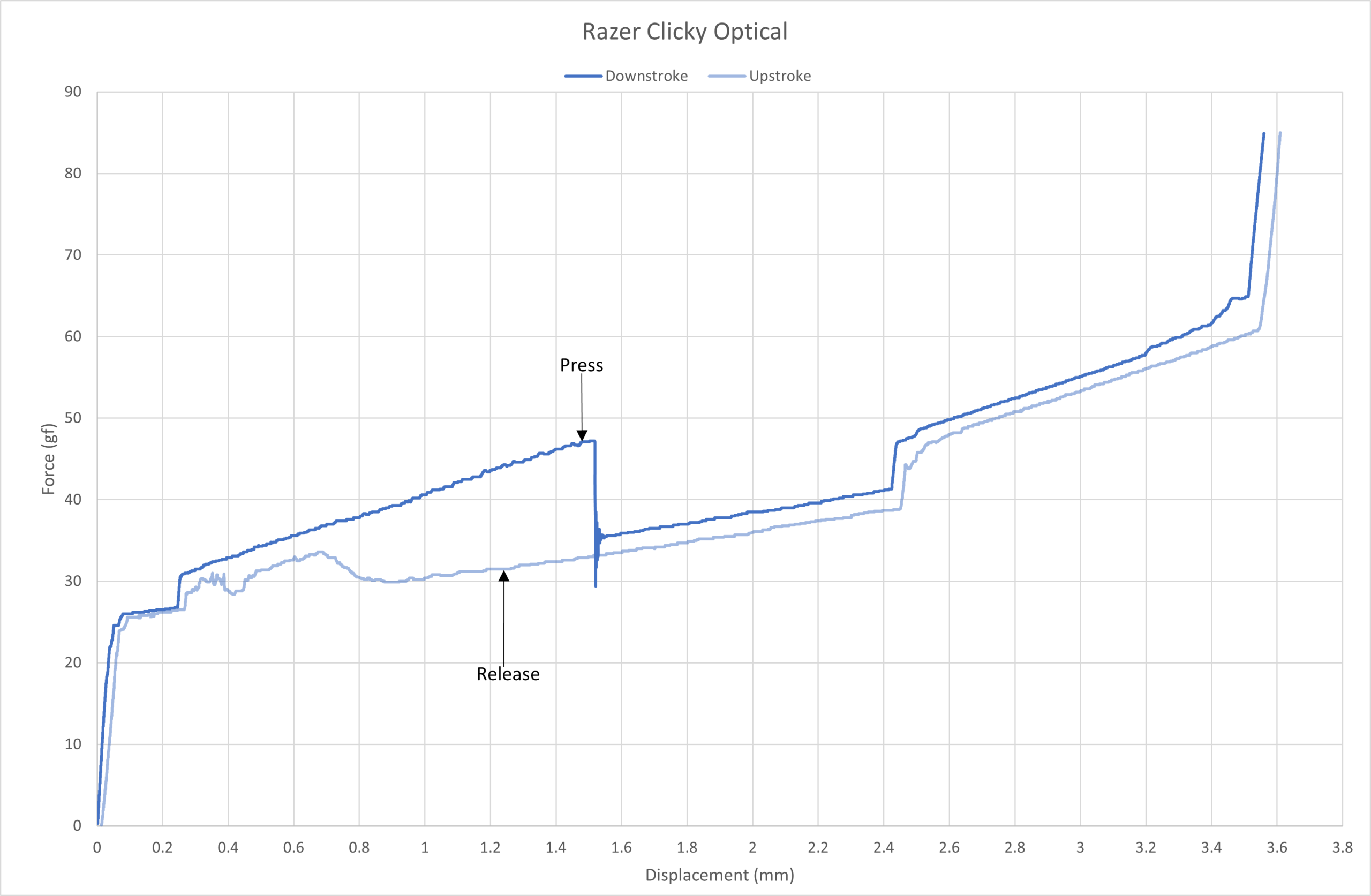
Razer Clicky Optical force curve.
As you can see from the force curve above, the Razer Clicky Optical is on spec apart from its bottom-out force, which Razer claims is around 75g. However, this was closer to 65g in my testing.
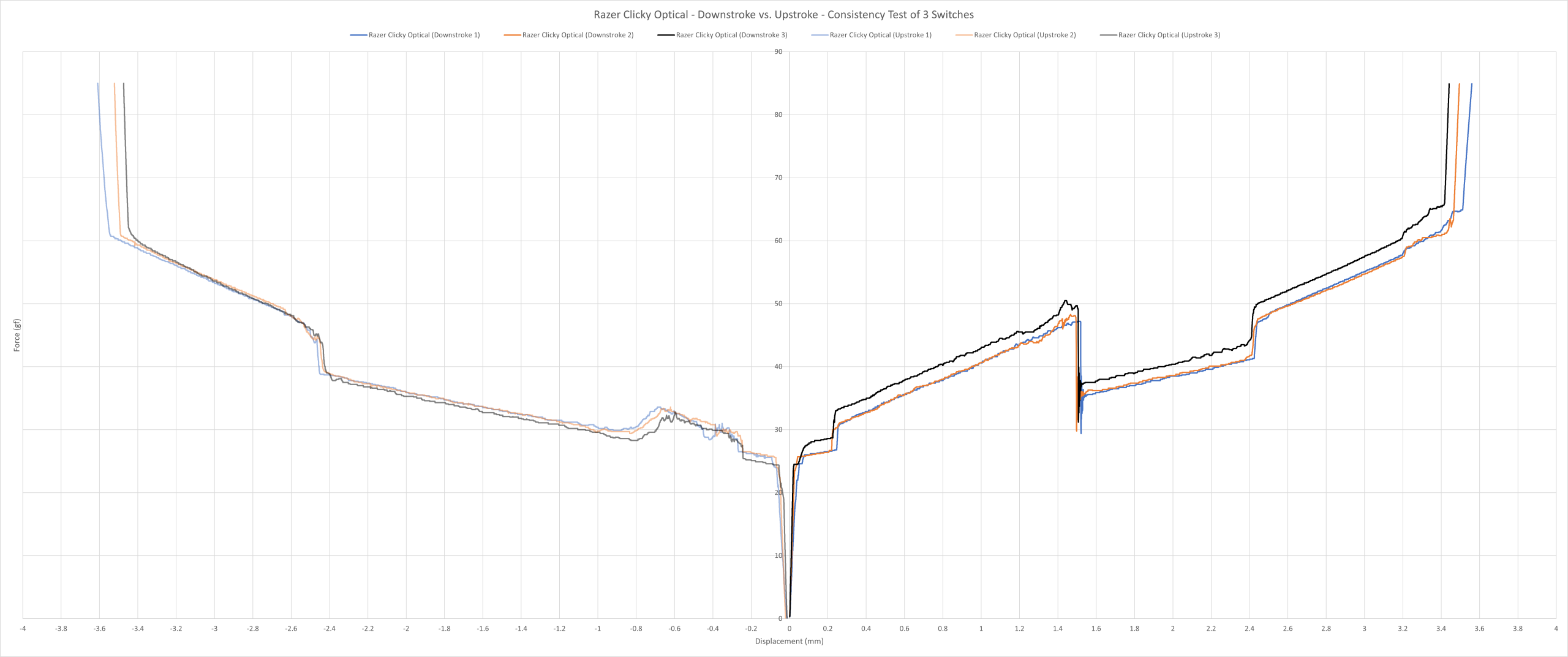
Razer Clicky Optical consistency force curve.
As you can see above, the switches are very consistent with Switch 3 being a few grams heavier compared to Switch 1 and 2 on the downstroke, but this is still within acceptable tolerance.
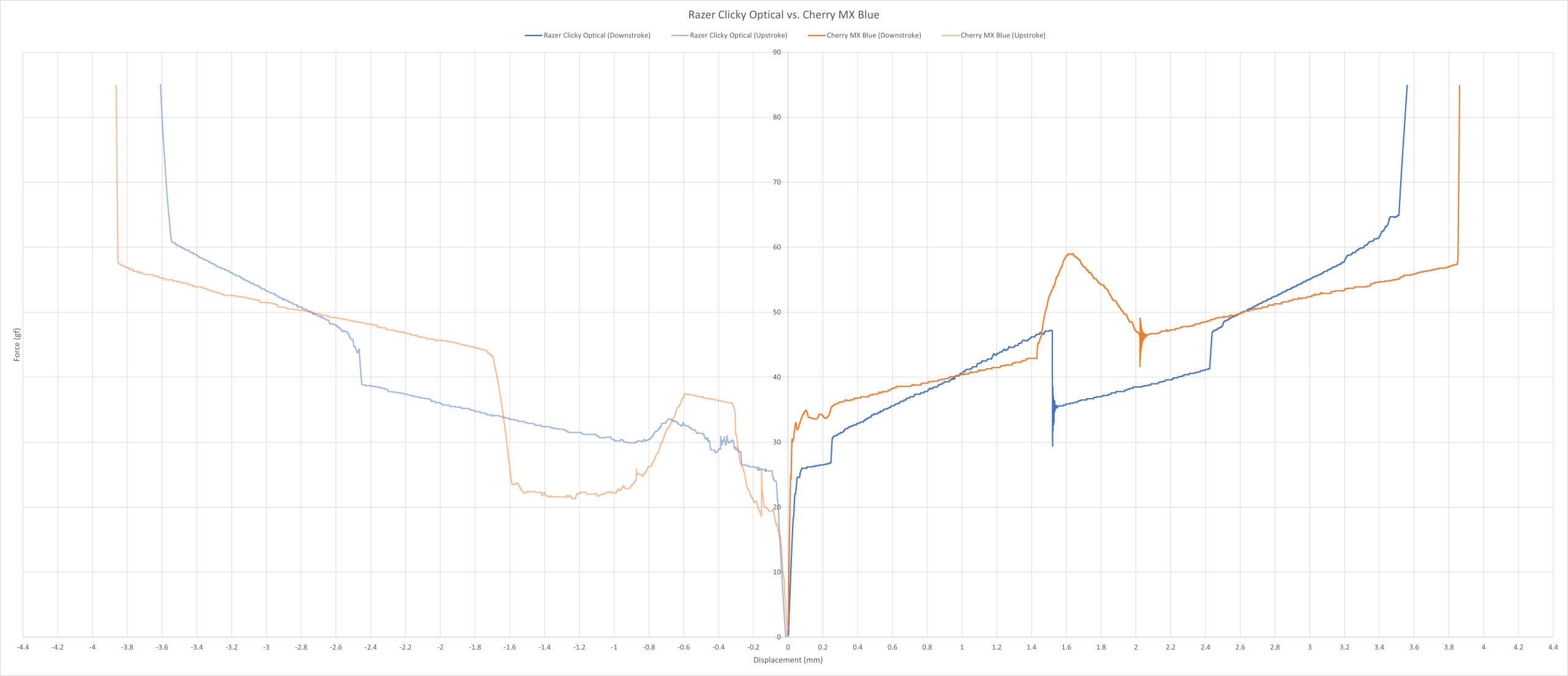
Razer Clicky Optical vs. Cherry MX Blue force curve.
The force curve above shows the comparison between the Razer Clicky Optical and the Cherry MX Blue. These two switches have completely different click mechanisms, hence why they look very different on the graph, but I wanted to compare it to a switch we all know.
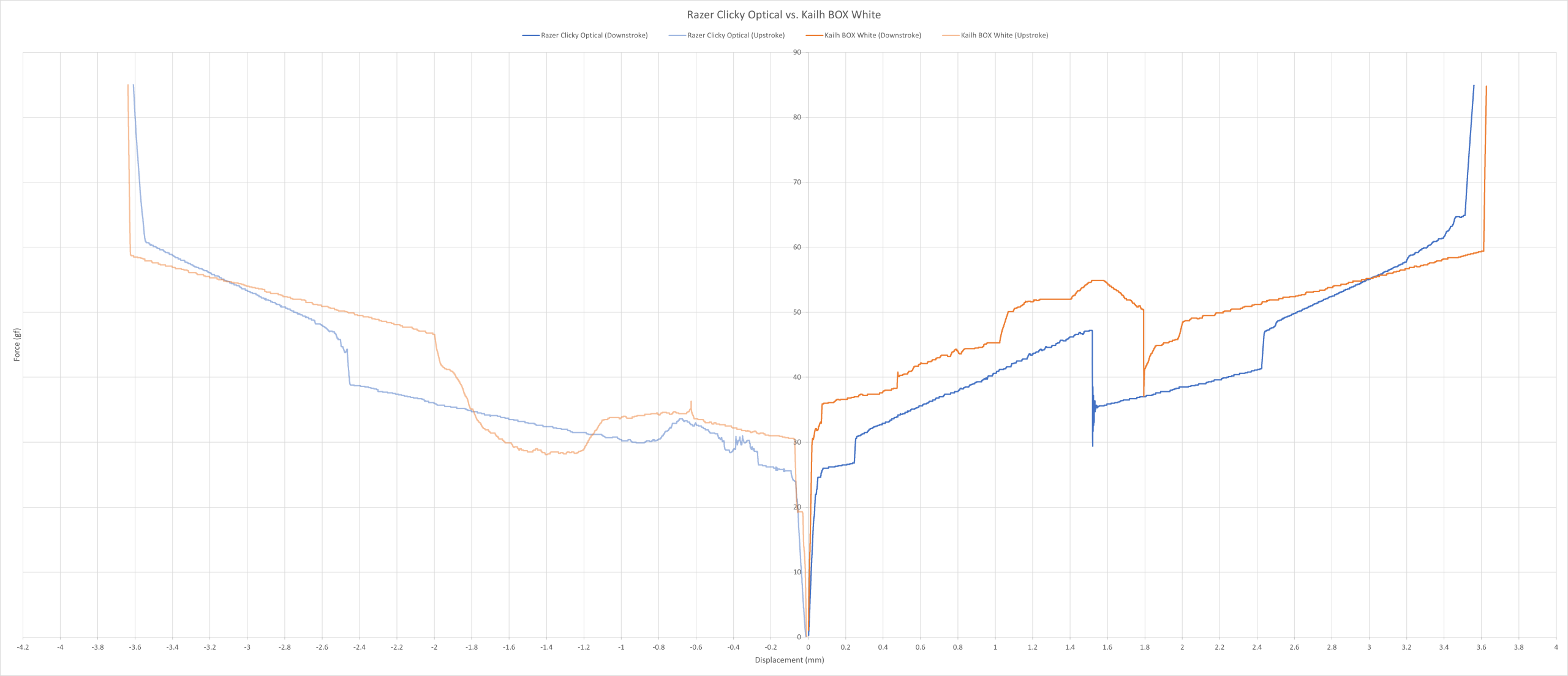
Razer Clicky Optical vs. Kailh BOX White force curve.
The force curve above shows the comparison between the Razer Clicky Optical and the Kailh BOX White. There are a few ways you can interpret this graph. I like to see it as the Razer switch being a smoother and lighter BOX clicky switch.
Overall, they’re lightly weighted switches, similar to both the Cherry MX Blue and the Kailh BOX White. Plus, they’re very consistent. And as far as clicky switches go, this is up there with the very best.
Sound: 7/10
The one thing you cannot escape is the ping! This obviously depends on how hard you press the keys, but the ping is very noticeable from the very first keypress. It’s not IBM Pingmaster level, but it’s certainly up there.
I also don’t prefer the sound of these clicky switches, they’re too high-pitched for me and spread out. They actually remind me of the Cherry MX Blue in a way, but somehow “refined”. For context, I prefer a crunchier sound similar to Alps SKCM Blue.
Overall, despite the ping, I don’t mind how they sound. Though it is worth noting that these still suffer from stabilizer rattle, but it is less noticeable given the clicky nature of the switch.
Typing Performance: 7/10
Its click mechanism lends itself well to a very crisp tactile experience (for the most part). The switches have a ‘delicate’ feel to them, although they have a very slight mushy and vague feeling just before the tactile event, but this isn’t noticeable when typing normally.
Other than that, they were very smooth and very consistent. The key feel is better than modern most clicky switches out there. It’s a shame Razer stopped putting these switches in their full-size keyboards.
Overall, while Razer made these for gaming, they can be used for productivity purposes too, which is a rare feat. I wish they would make a heavier variant, but given how unpopular these are, that’s unlikely to happen.
Gaming Performance: 7/10
These were equally good for both fast and slow-paced games. Although, I found them to be better suited for fast-paced games, as they aren’t exactly the most precise switch given its clicky nature.
Additionally, these switches are on the louder side, so you’ll have to get used to hearing them in the background in quieter games (i.e. stealth games, walking sims). Personally, I found that they didn’t distract me in any of the games I played.
Overall, they wouldn’t be my number one choice for gaming, but they’re a good hybrid switch if that’s what you’re looking for.
Final Score = 36/50 (72%)