
| Switch Type: Tactile |
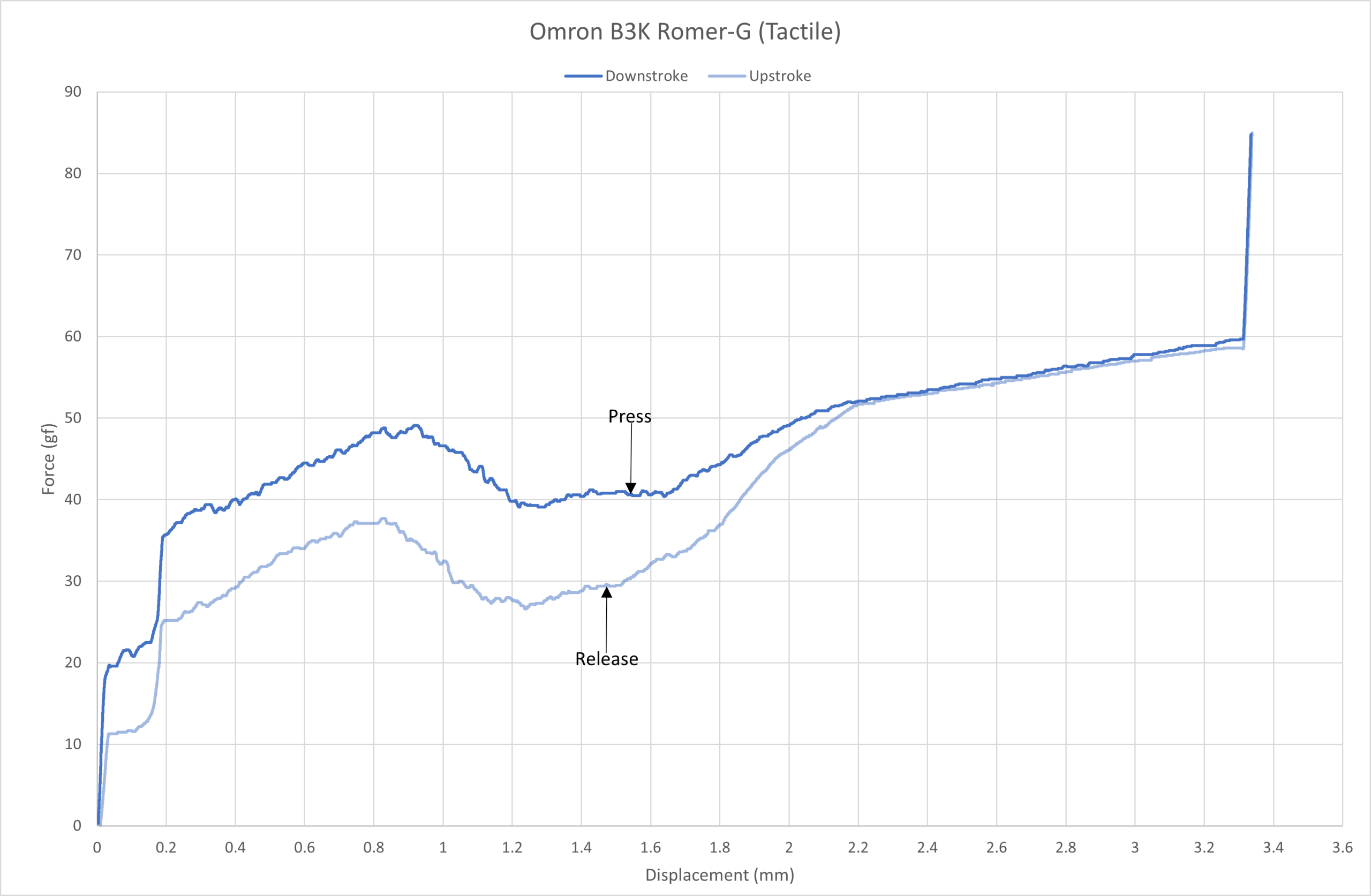
| Actuation Point (mm): | 1.5 | Actuation Point (mm): | 1.55 |
| Actuation Force (gf): | 45 | Actuation Force (gf): | 40.5 |
| Total Travel (mm): | 3.2 | Total Travel (mm): | 3.31 |
| Peak Tactile Point (mm): | Peak Tactile Point (mm): | 0.92 | |
| Peak Tactile Force (gf): | Peak Tactile Force (gf): | 49.1 | |
| Reset Point (mm): | Reset Point (mm): | 1.46 | |
| Bottom-out Force (gf): | Bottom-out Force (gf): | 59.7 | |
TL;DR
If I had the choice between these and the Cherry MX Brown, I’d pick the Cherry switch. These are very scratchy and highly inconsistent; it makes me wonder how it got 2 generations. In other words, I don’t recommend them in the slightest.
Smoothness: 3/10
On-centre keypresses are decently scratchy and inconsistent at slow keypresses.
Off-centre keypresses are extremely scratchy – these are also among the most inconsistent switches in the modern era.
Overall, I can’t believe this switch was sold on the market! It was really successful too… which goes to show that people either didn’t care about what switch was installed on their keyboard or that the market was uncompetitive at the time.
Weighting: 3/10
Now, according to Logitech these switches have an actuation force of 45g at 1.5mm and a total travel of 3.2mm.
Omron B3K “Romer-G” Tactile force curve.
As you can see from the force curve above, the Romer-G (Tactile) is on spec in all areas.
Omron B3K “Romer-G” Tactile consistency force curve.
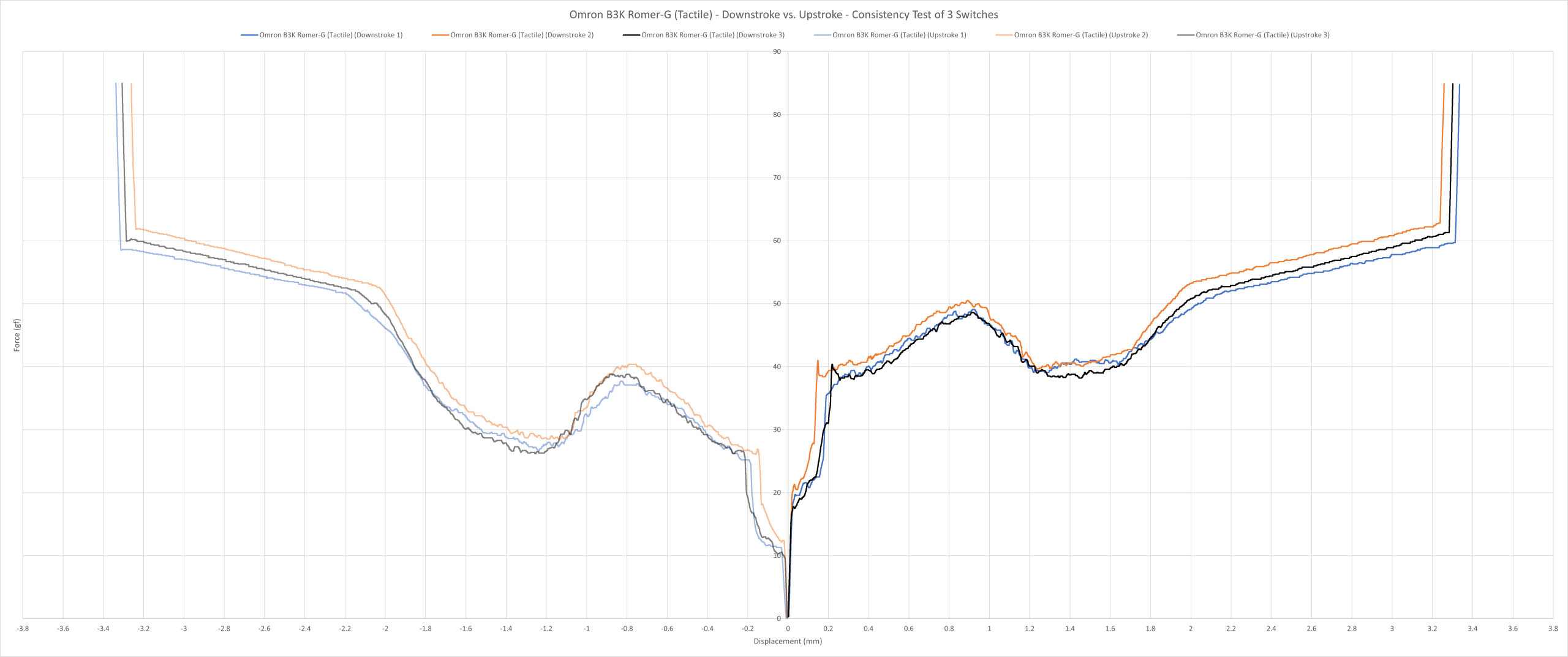
As you can see above, the switches are inconsistent with weighting variances all around throughout travel in both the up and downstrokes.
Omron B3K “Romer-G” Tactile vs. Cherry MX Brown force curve.
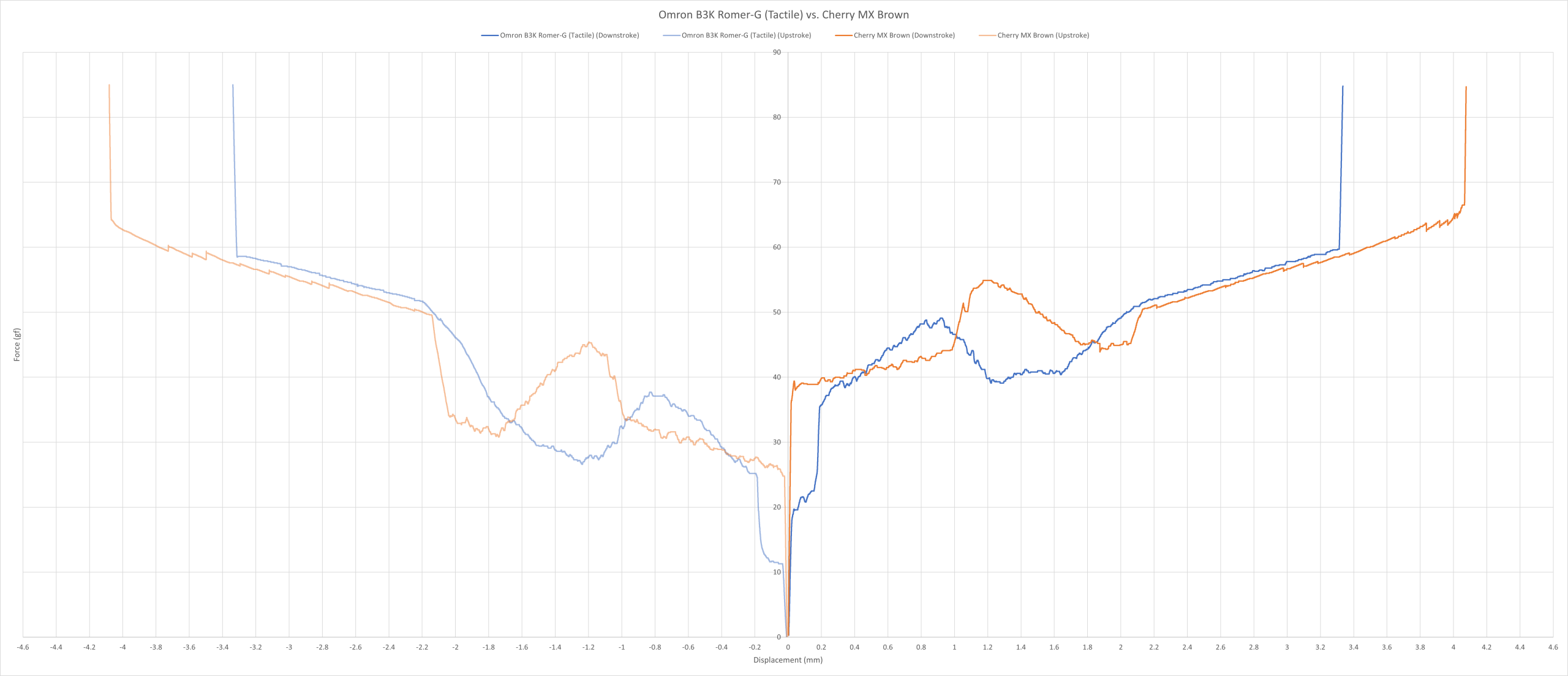
The force curve above shows the comparison between the Romer-G (Tactile) and the Cherry MX Brown. The Romer-G has an earlier tactile peak around 0.9mm with a force of just under 50g, while the MX Brown peaks around 1.2mm with a force of around 55g. Additionally, the Romer-G has a shorter travel of around 3.3mm compared to the 4mm of the MX Brown.
On paper the Romer-G switch is the superior choice, but not in practice.
Omron B3K “Romer-G” Tactile vs. Kailh Brown force curve.
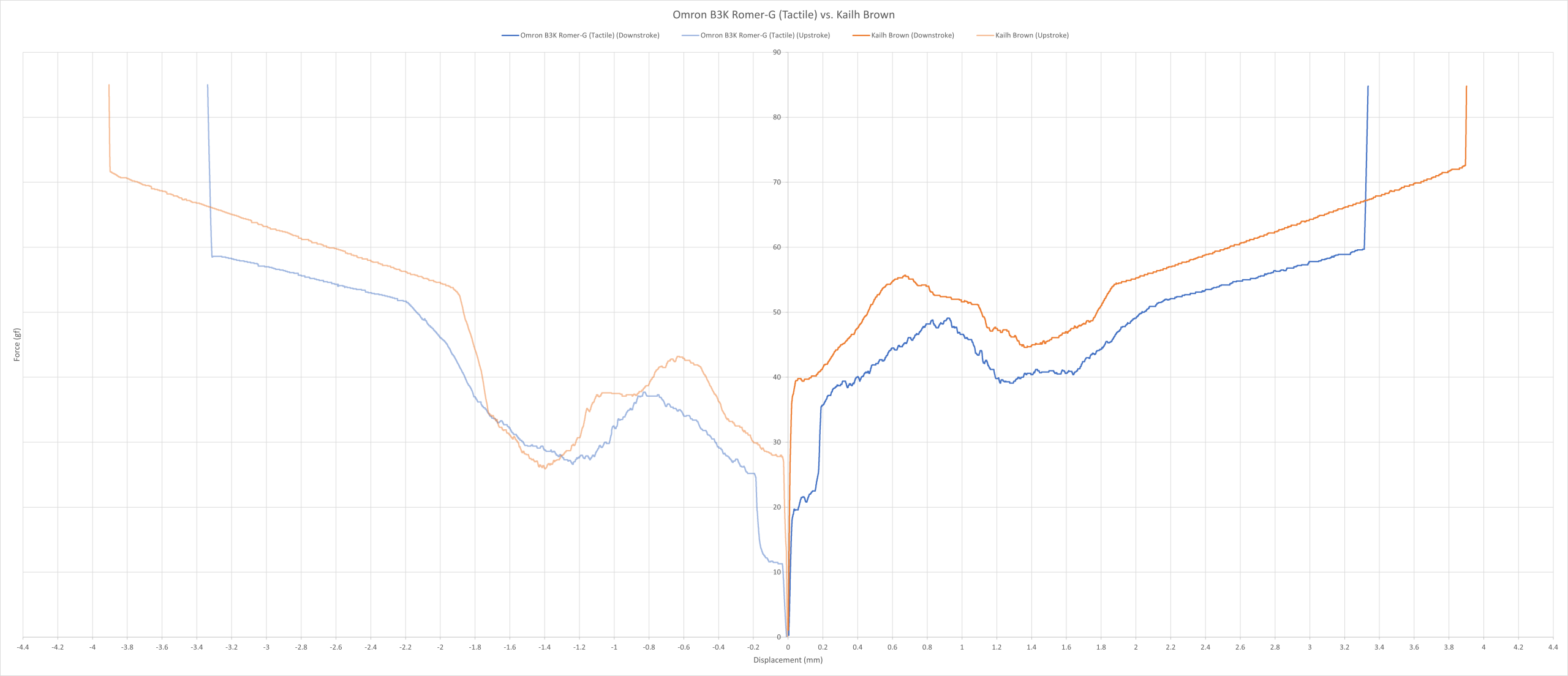
The force curve above shows the comparison between the Romer-G (Tactile) and the Kailh Brown. It definitely looks like the Romer-G is the lighter and shorter version of the Kailh Brown.
Overall, they’re lightly weighted and have consistency issues all around. They’re worse than the MX Brown, so I can’t understand why anyone would pick these voluntarily unless it was given to them for free… and if that’s the case; sell it and buy a keyboard with better switches. Done.
Sound: 4/10
Unsurprisingly, they have a scratchy sound to them. They also ping a LOT! It’s not obvious at all when typing in a louder environment, but it’s painfully apparent in a very quiet room.
Overall, it’s not the worst sounding switch – there are worse candidates, believe me. But pair the above description with a ticking spacebar in desperate need of lubrication, these won’t gain any praise from me.
Typing Performance: 4/10
They’re horrendous to type on. Not only are they scratchy and inconsistent, they also chatter and ghost – it’s a combination of the worst switch traits rolled into one.
I think the one redeeming factor is that they aren’t totally horribly weighted. Sure, they’re lighter than I would’ve liked, but I’ve typed on lighter switches that have given me more pain than these. But that barely counts as a compliment.
So yes, I made plenty of typos, and was either frustrated or annoyed (or both) while using them. It should be very clear that I do not recommend typing on these, and especially so if you work with sensitive data.
Overall, I’d rather type on a Cherry MX Brown or a quality rubber dome than these. And if you still happen to have these and want to keep it, despite what I’ve said, then I’m not sure what the solution is. However, if you don’t have these and want to buy one. Don’t.
Gaming Performance: 6/10
Despite how scratchy and inconsistent they are, they’re actually pretty decent for most gaming scenarios. By no means are they the most accurate; I wouldn’t use them in precision oriented slower-paced games like bullet hells, for example. But they’re more than usable in many fast-paced games.
If most people bought these for gaming back then, and I suspect many did, then it probably served them well, given the options for new keyboards at the time were less than ideal.
Overall, these aren’t close to perfection. Heck, they aren’t even very good in my books. And even though they’re decent, I’d still consider staying away from them unless you find one for free.
Final Score = 20/50 (40%)