
| Switch Type: Linear |
| Actuation Point (mm): | 1.2 | Actuation Point (mm): | 1.27 |
| Actuation Force (gf): | 45 | Actuation Force (gf): | 46.4 |
| Total Travel (mm): | 3.2 | Total Travel (mm): | 3.17 |
| Peak Tactile Point (mm): | Peak Tactile Point (mm): | ||
| Peak Tactile Force (gf): | Peak Tactile Force (gf): | ||
| Reset Point (mm): | Reset Point (mm): | 1.24 | |
| Bottom-out Force (gf): | 60 | Bottom-out Force (gf): | 63.7 |
TL;DR
You may think this is just a shorter travel Cherry MX Red; and in a sense, you’d be correct. However, aside from being shorter, these are roughly 7 – 10 grams heavier than the standard Cherry MX Red. In fact, their weighting is closer to that of the Fnatic Speed Low Profile switch in every aspect.
As for their performance? They’re pretty bad. Don’t bother with these! They’re essentially just as scratchy, if not more so, than the standard Cherry MX Red.
Smoothness: 4/10
On-centre keypresses are moderately scratchy and slightly inconsistent at slow keypresses.
Off-centre keypresses are very scratchy and fairly inconsistent at slow keypresses.
Overall, they’re scratchy and inconsistent even at normal typing speeds. I wouldn’t recommend them if you’re looking for any form of smoothness in a switch.
Weighting: 4/10
Now, according to Cherry these switches have actuation force of 45g at 1.2mm and a bottom-out force of 60g at 3.2mm.
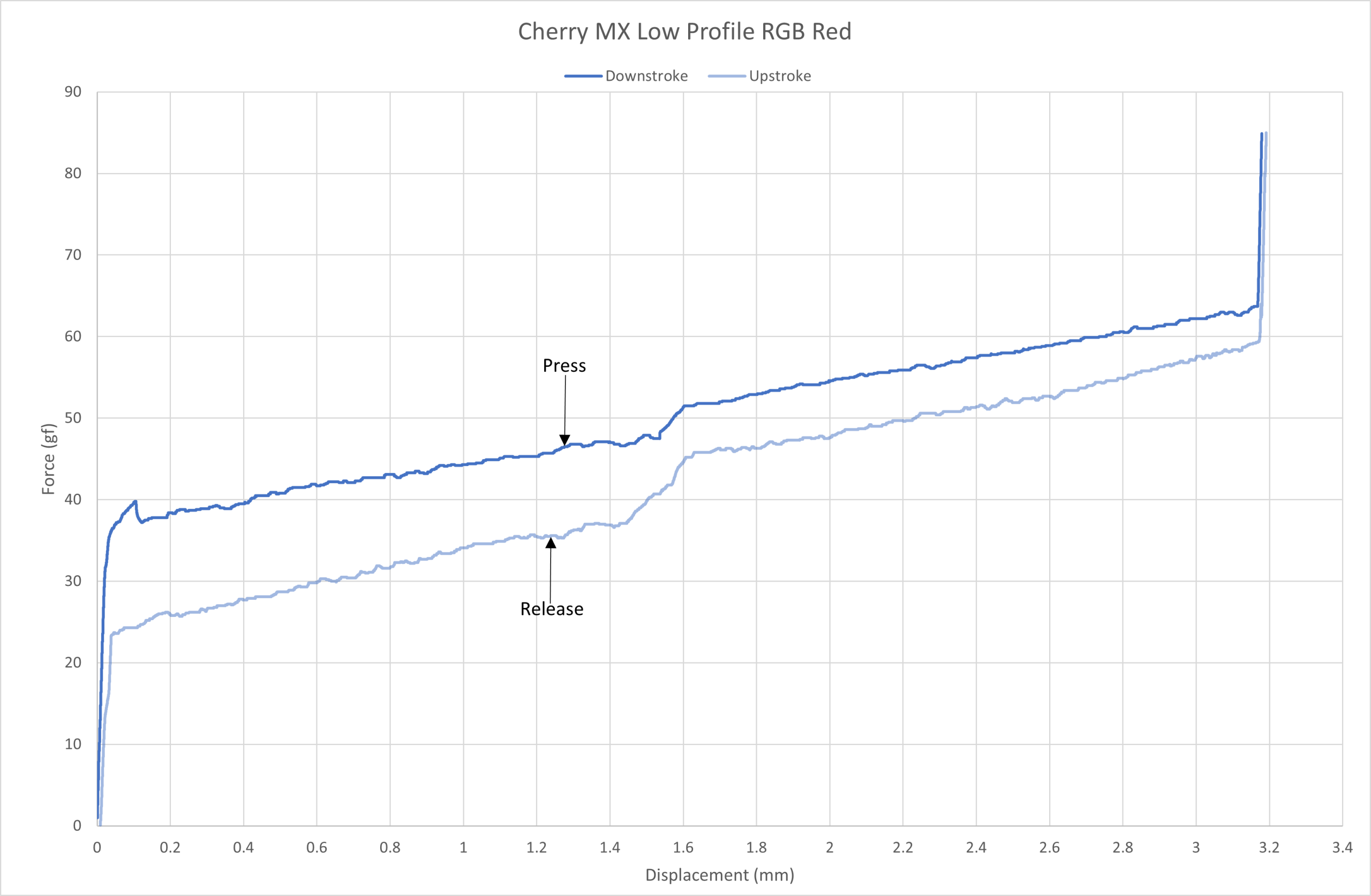
Cherry MX Low Profile RGB Red force curve.
As you can see from the force curve above, the Cherry MX Low Profile RGB Red is on spec.
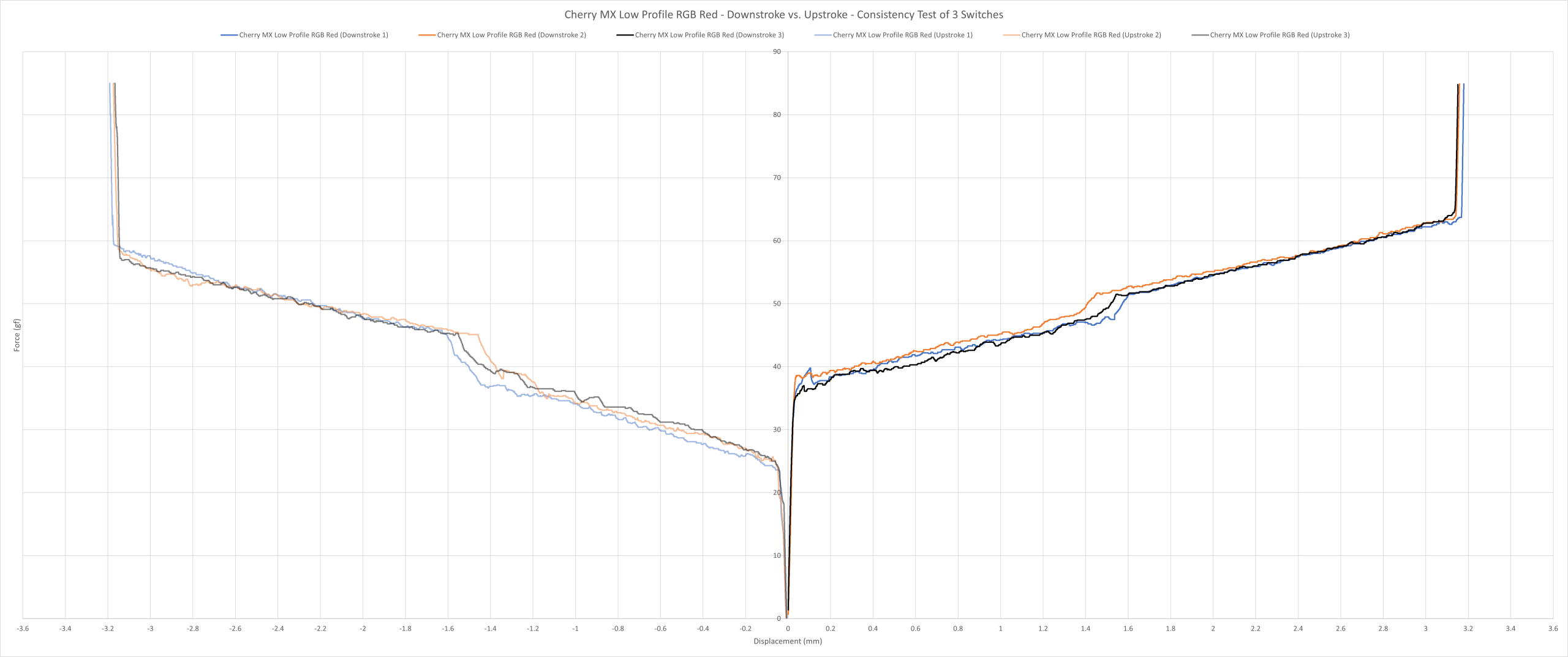
Cherry MX Low Profile RGB Red consistency force curve.
As you can see above, the switches aren’t very consistent with each other, especially before the actuation point. Although, they are all still within spec.
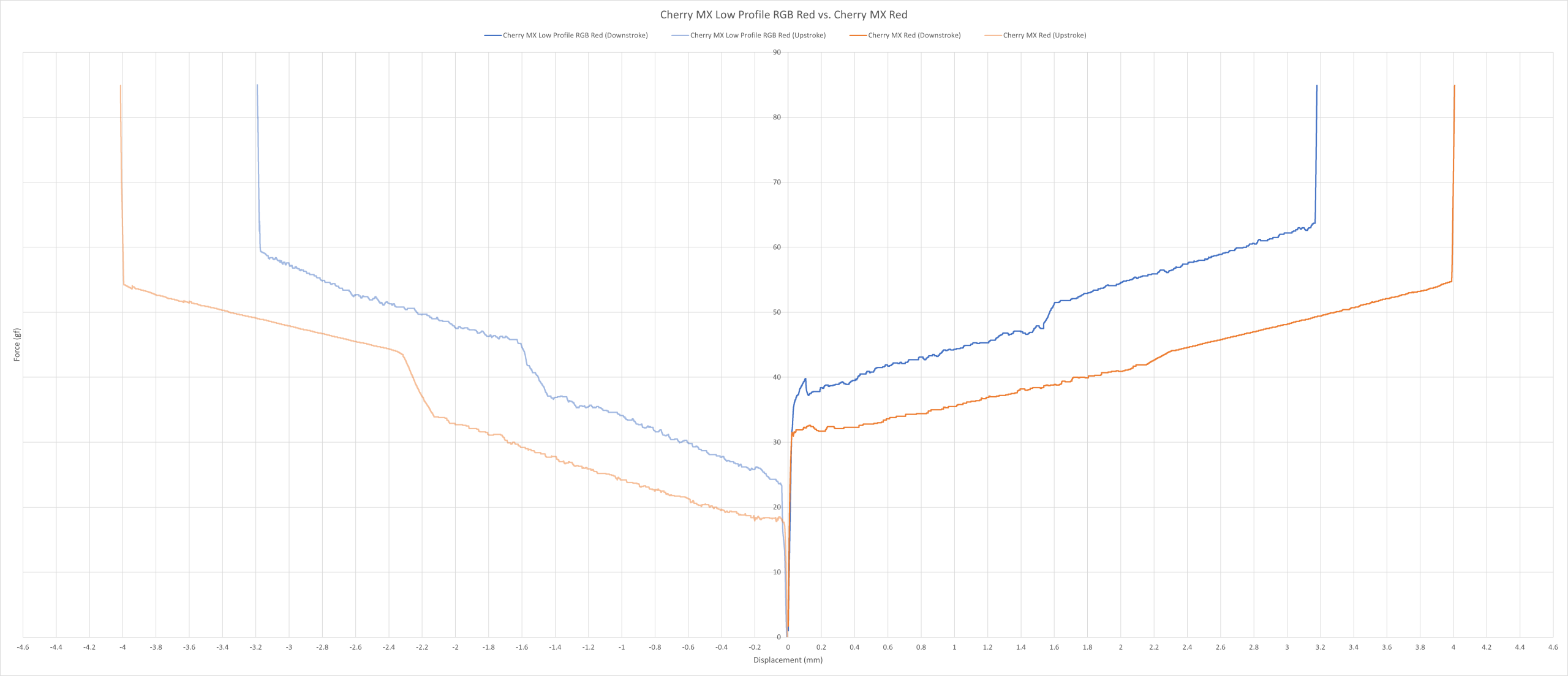
Cherry MX Low Profile RGB Red vs. Cherry MX Red force curve.
The force curve above shows the comparison between the Cherry MX Low Profile RGB Red and the Cherry MX Red. Apart from the longer travel on the regular Cherry MX Red, the LP variant is heavier by around 7 – 12 grams on both the up and downstroke.
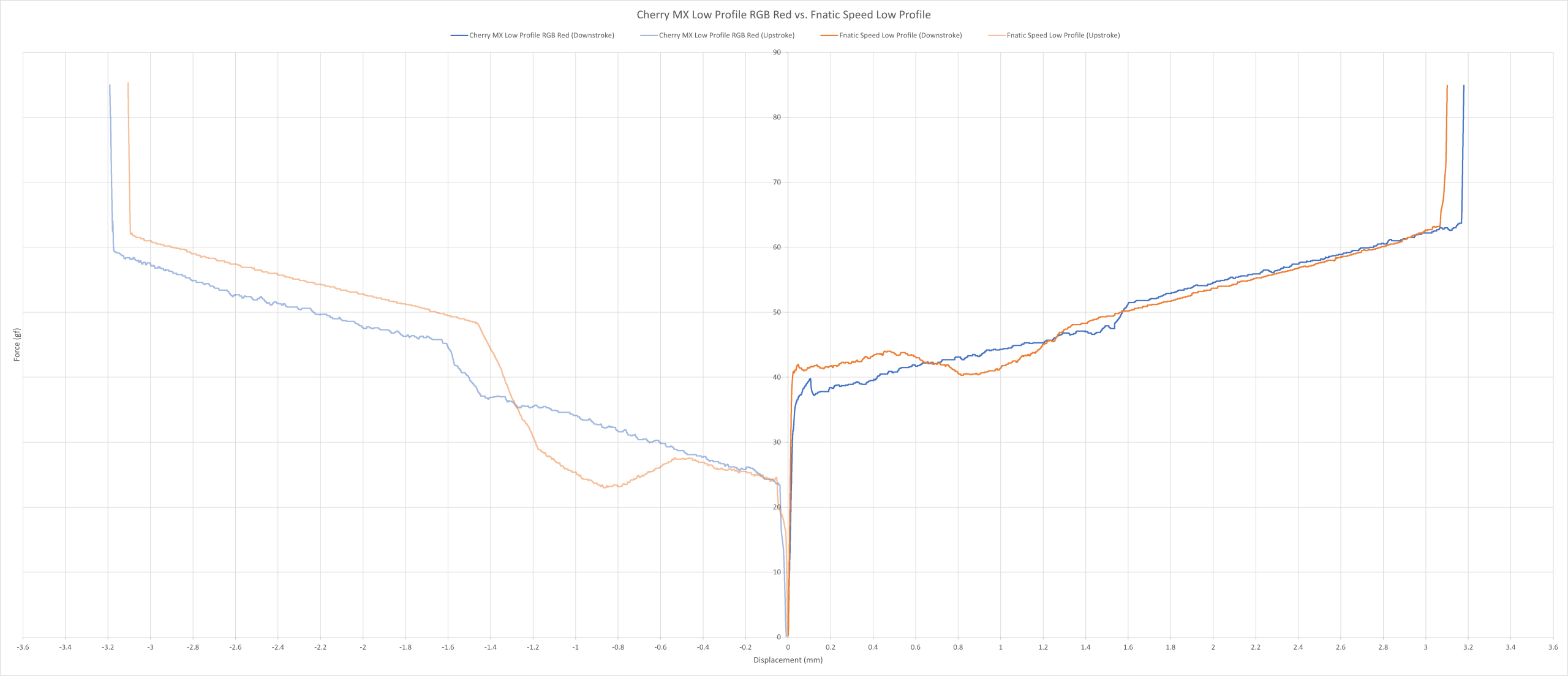
Cherry MX Low Profile RGB Red vs. Fnatic Speed Low Profile force curve.
The force curve above shows the comparison between the Cherry MX Low Profile RGB Red and the Fnatic Speed Low Profile. It’s as if the Fnatic switch is a clone here – they have almost the identical weighting on the downstroke.
Overall, despite them being heavier than the Cherry MX Red, they’re still fairly lightly weighted switches with noticeable inconsistencies. I personally wouldn’t use these at all.
Sound: 5/10
As far as non-silenced switches go, these are on the quieter side. You can probably get away with bringing this into an open office without making any modifications.
I’m just not a fan of their sound, though. If you listen carefully, you can hear hints of spring ping. Plus, given how scratchy these are, you can sometimes hear those too.
Overall, nobody is buying these for their sound, but if you don’t mind a quieter, non-silenced switch with the noise of scratchiness included, then you can consider this. Otherwise, I would recommend looking elsewhere.
Typing Performance: 4/10
I’ve made loads of typos due to their somewhat light weighting and inconsistent performance.
However, the keycaps also played a role here. Normally, I don’t discuss keycaps influencing the typing experience since they’ve had minimal to no effect in the past. But the (almost) flat keycaps Cooler Master installed on this keyboard made it much harder to type on them as they barely had any sculpture on them – this meant I kept pressing neighbouring keys by accident on a much more frequent basis.
Overall, while I understand the decision to install flat, low-profile keycaps, the choice of switch leaves a lot to be desired given their scratchy and inconsistent performance. This keyboard may work well as a backup, perhaps, but as a daily driver? Definitely not.
Gaming Performance: 5/10
Their scratchiness and inconsistencies did not help them in slower-paced games. It was tough to have to be accurate with them, and even more so with those god-awful keycaps. So yes, any form of precision outside of keymashing was much harder to achieve.
But what about faster-paced games? Well, they did perform a little better here, but not much more I’m afraid. I could still feel their scratchiness – and yes, the keycap problem presents itself here too.
Overall, I don’t know why anyone would want to game on these. I guess, if you travel with your keyboard and don’t have a lot of space, sure these would work; just be aware of its compromises.
Final Score = 22/50 (44%)